
What is dithering?
Dithering in astrophotography is a technique where you intentionally shift the camera a few pixels in a random direction between exposures (sub-frames). While it may sound counterproductive to purposely move a telescope you spent hours perfectly aligning, it is one of the most powerful tricks for capturing crisp, clean deep-sky images.
To explain what’s behind this technique, we need to define another term: pattern noise.
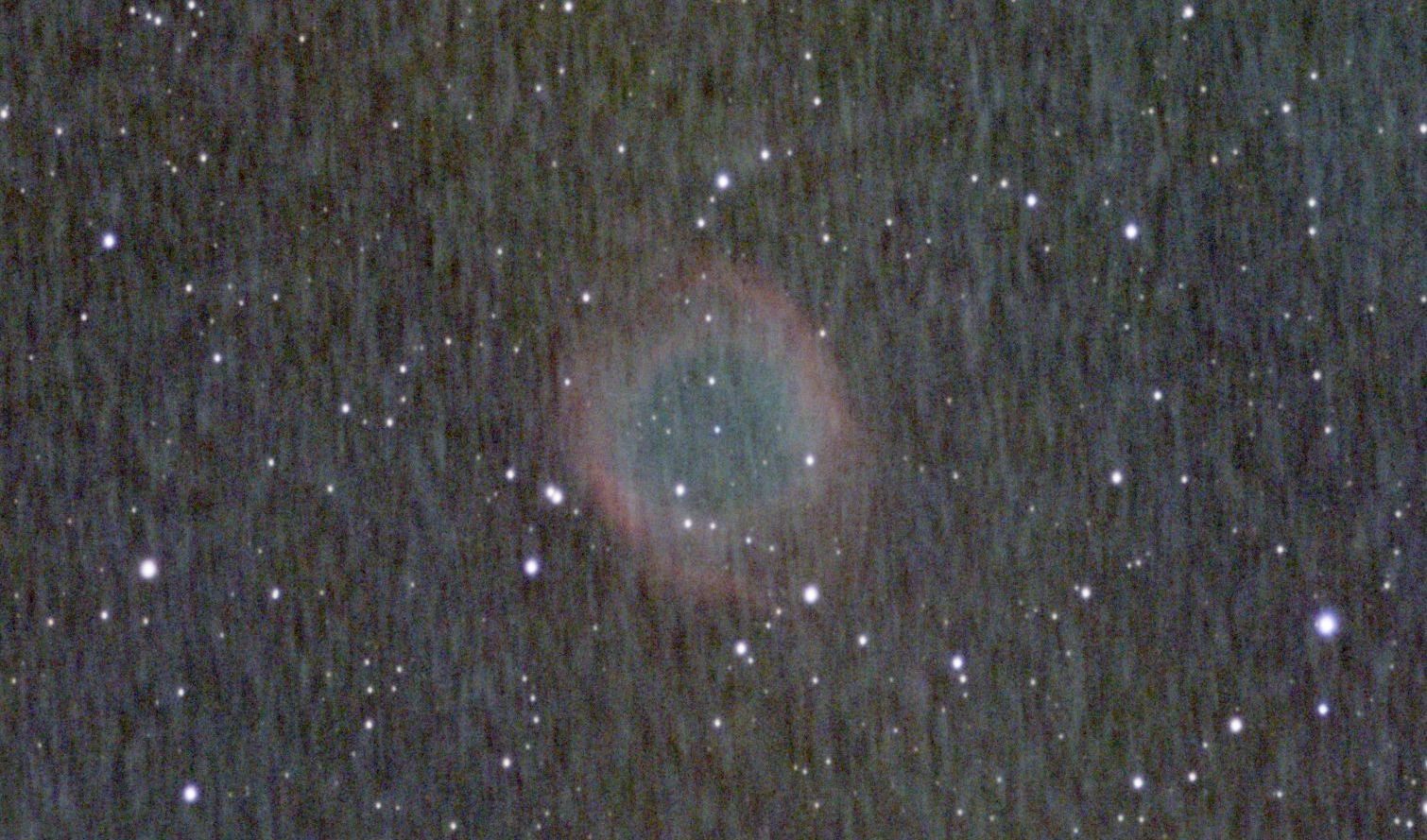
Every digital camera sensor suffers from fixed-pattern noise, often called thermal noise, hot pixels, or cold pixels. Because these defects are physically locked to specific pixels on your sensor, they appear in the exact same spot on every single photo you take.
Without dithering, these bad pixels line up perfectly across dozens of images. When you stack your images together to reduce background noise, two bad things happen. First, the defects are reinforced. The software thinks the hot pixels are real stars or nebulae and preserves them. The second is called walking noise or rain noise. Because your telescope tracking is never 100% perfect, the stars will slowly drift across the sensor over several hours. When stacked, those fixed hot pixels stretch out into ugly, diagonal streaks that look like falling rain or brushed metal.
When you dither, you move the telescope slightly between shots. This means the target galaxy or nebula lands on a different set of pixels every time, while the sensor’s defects stay in the exact same physical spots.
How does it work?
It may be a bit hard to imagine, but let’s look at and analyse a very simplified example.
Let’s assume your camera has a defect: a hot pixel at (50,50). Your picture (subframe) contains a star at 10,20.
Here is what would happen without dithering:
Shot 1: [Star] is on Pixel (10,20). [Hot Pixel] is on Pixel (50,50).
Shot 2: [Star] is on Pixel (10,20). [Hot Pixel] is on Pixel (50,50).
As a result, your stacking software thinks both are real objects.
Now, what will happen with dithering:
Shot 1: [Star] is on Pixel (10,20). [Hot Pixel] is on Pixel (55,55).
Shot 2: [Star] is on Pixel (12,19). [Hot Pixel] is on Pixel (55,55).
When your software aligns the stars, the Hot Pixel “moves” relative to them and is rejected as an error.
Clever, isn’t it? When stacking software aligns your stars later, it recognises the hot pixels as random statistical anomalies (since they aren’t tracking with the stars) and completely deletes them from the final image. Dithering has several benefits.

It eliminates the Walking Noise. It completely destroys the streaky, structural noise that ruins deep-sky backgrounds.
Dithering allows for “Drizzling”. If you dither, you can use an advanced stacking technique called Drizzle (originally developed for the Hubble Space Telescope) to artificially upsample your image and recover lost resolution. Drizzle is a technique you can find in a popular and powerful piece of software, PixInsight, developed by Pleiades Astrophoto S.L.
It also reduces the need for Dark Frames. Don’t get me wrong. I am not suggesting you should question the need to take calibration Dark Frames. It is still a good practice. Yet dithering is so effective at removing hot pixels that many mobile smart-telescopes rely entirely on dithering instead of taking darks.
How do I set up my equipment to perform dithering?
Unfortunately, I can provide the instructions only for the software I use, which is NINA and PHD2; however, I am sure you will find similar settings in any modern software. So, let’s start with the PHD2. Open it, connect your equipment (tracker and guiding camera – it doesn’t matter if you use the separate guide scope or the off-axis guider), and click the ‘brain’ icon (or from the menu Guide/Advanced settings). In the Global tab, find the Dither Settings. Set Mode to Random and scale to 1. Sometimes you’ll see a hint that you can lower this value when your guide scope focal length matches the main scope (like when using the OAG), but I use 1 for the OAG, and it works perfectly. Click OK.
Now NINA. Go to the Equipment menu, find and open Guider. When you connect the PHD2, you will see a set of options on the right. Set the Dither pixels between 2 and 5 (I am using 5), but if your main telescope has a much longer focal length than the guide scope, you may need to push the value up to 7 pixels.
The last question is how often you should dither. The answer depends on the exposure length. If you are doing relatively short exposures, like 30 to 60 seconds, you can dither every 2 or 3 frames. This will leave time to settle the mount afterwards. For longer exposures, like 2-5 minutes, some sources say you should dither every frame. I dither every 4 frames for exposure times from 60 to 300 seconds. You can use my settings or (what I strongly suggest) do your own tests and find your perfect value. In general, it is much easier to start with values provided by others, but later, try to understand why you use them and find your own settings.

More Stories
Refractor vs Reflector Telescope: Which Is Best for Beginners and Astrophotography?
What is PSF – Point Spread Function?
Calibration frames and why do we need them